Text Analytics
Customers often type a few words after they rate you. Text Analytics reads all of those comments for you and sorts them out, so you do not have to scroll through them one by one.
It tells you three things:
- What people talked about — themes and keywords pulled out of the text.
- How they felt — whether each comment sounds positive, negative or neutral.
- Where it happened — which branch, section, touchpoint or question the comment came from.
Open it from the Insight menu, then Text Analytics.
Sentiment in plain words
Sentiment is simply the mood of a comment. "The staff were very kind" sounds positive. "Waited 25 minutes" sounds negative. "I came at noon" is neutral.
Every comment gets a sentiment score — a number from -1 (very negative) to 1 (very positive). Positive scores show in blue, negative in red, neutral in grey. See Sentiment Score in the glossary for the exact ranges.
Two words are used a lot on this screen:
- Cluster — a theme the system found across many comments, such as cleanliness or friendliness. Clusters are grouped under a broader cluster category such as staff or quality.
- Topic — a single keyword or phrase taken straight out of a comment, such as parking or wait time.
Filters
The bar at the top sets the date range, and lets you narrow by touchpoint, weekday and hour of day.
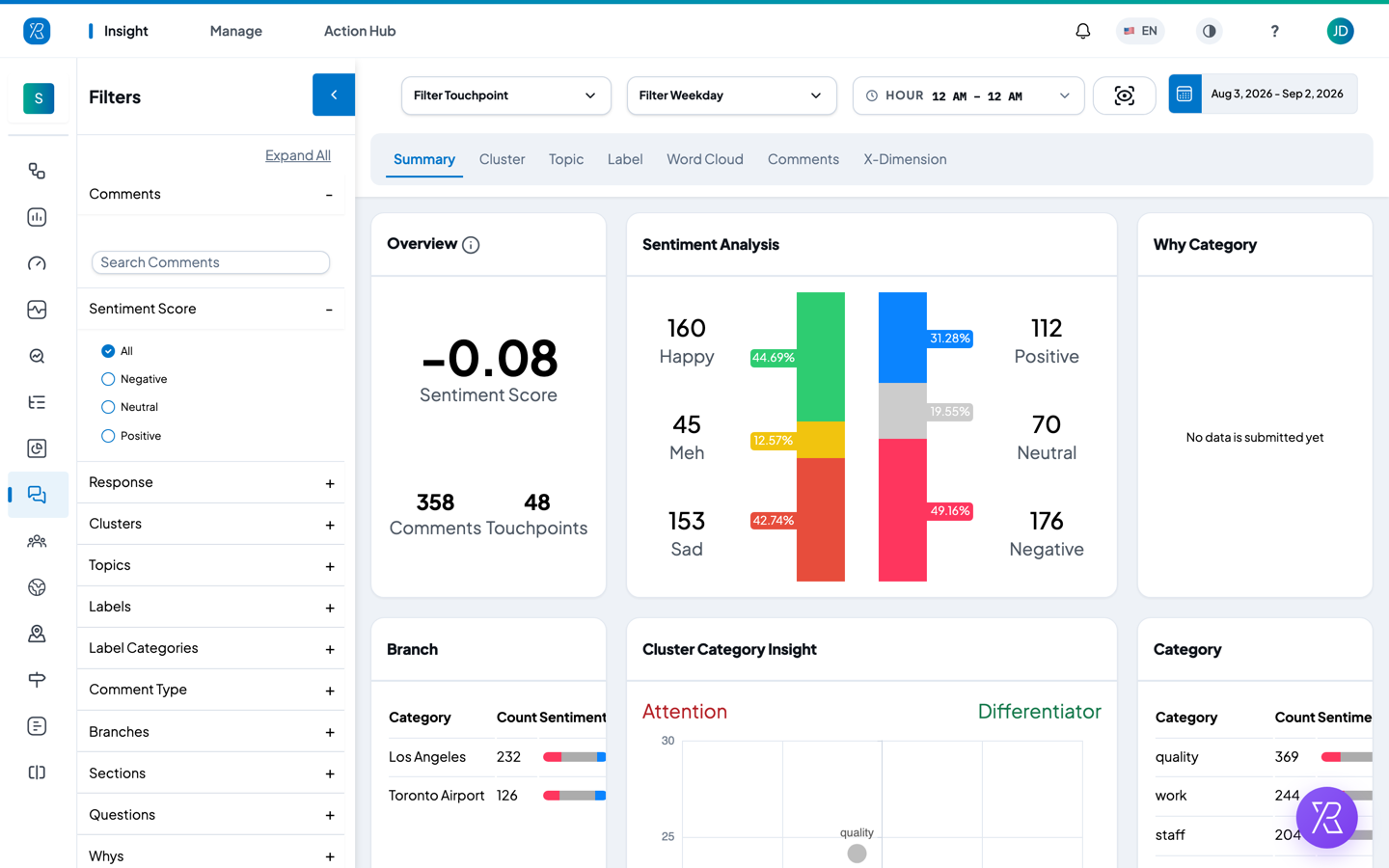
The Filters panel on the left narrows things further. Use Search Comments to find a word, or pick a Sentiment Score of All, Negative, Neutral or Positive. Below that you can filter by response, cluster, topic, label, label category, comment type, branch, section, question and why.
Click the arrow at the top of the panel to collapse it and give the charts more room.
Summary
The overview. Start here.
- Overview — the average sentiment score, how many comments there are, and how many touchpoints they came from.
- Sentiment Analysis — two bars side by side. The left bar is how people rated you (Happy, Meh, Sad). The right bar is how their comments sound (Positive, Neutral, Negative). If the two disagree, the written comments are telling you something the rating did not.
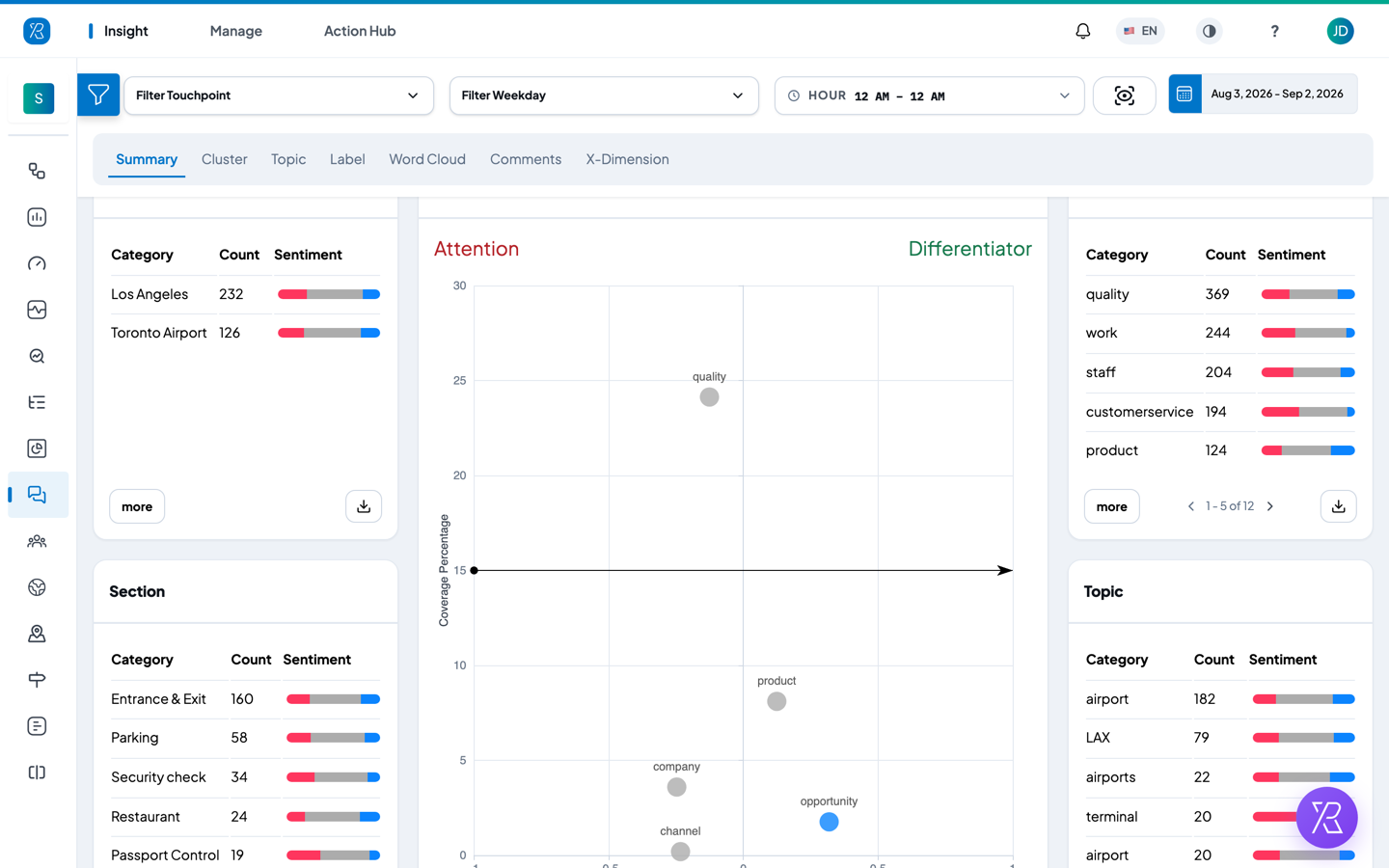
- Why Category, Branch, Category, Section, Topic — small tables ranking each group by number of comments, with a coloured bar showing the mix of positive, neutral and negative. Click more to see the whole list, or the download arrow to export it.
- Cluster Category Insight — a scatter chart. Left to right is sentiment, from -1 to 1. Bottom to top is coverage — what share of your comments mention that theme. That gives four corners: Attention (mentioned a lot, spoken of badly), Differentiator (mentioned a lot, spoken of well), Monitor (rarely mentioned and negative) and Opportunity (rarely mentioned but positive).
- Top Reasons — the reasons customers picked most often, each split into positive, neutral and negative. This one stays empty unless the reason question is turned on for your touchpoints.
- Comment Sentiment Trend — how mood moved day by day. The blue line is the average sentiment score for that day, read against the left axis. The bars behind it count the positive, neutral and negative comments, read against the right axis.
Cluster
Answers "which themes keep coming up, and how do people feel about them?"
Cluster Trend at the top charts each cluster by number of comments, coloured by sentiment. Below it, the Cluster table lists every cluster with its category, its comment count and its average sentiment. Use the download arrow to export the table.
Click a row and the Comment panel on the right filters down to just the comments in that cluster. Each comment card shows its sentiment score in a coloured circle, the date and time, the rating the customer gave, and the theme chips found in the text. Inside the comment, each sentence is shaded on its own — red where it reads negative, blue where it reads positive — so you can see which part of a long comment is the complaint. Use the Newest dropdown to reorder the cards.
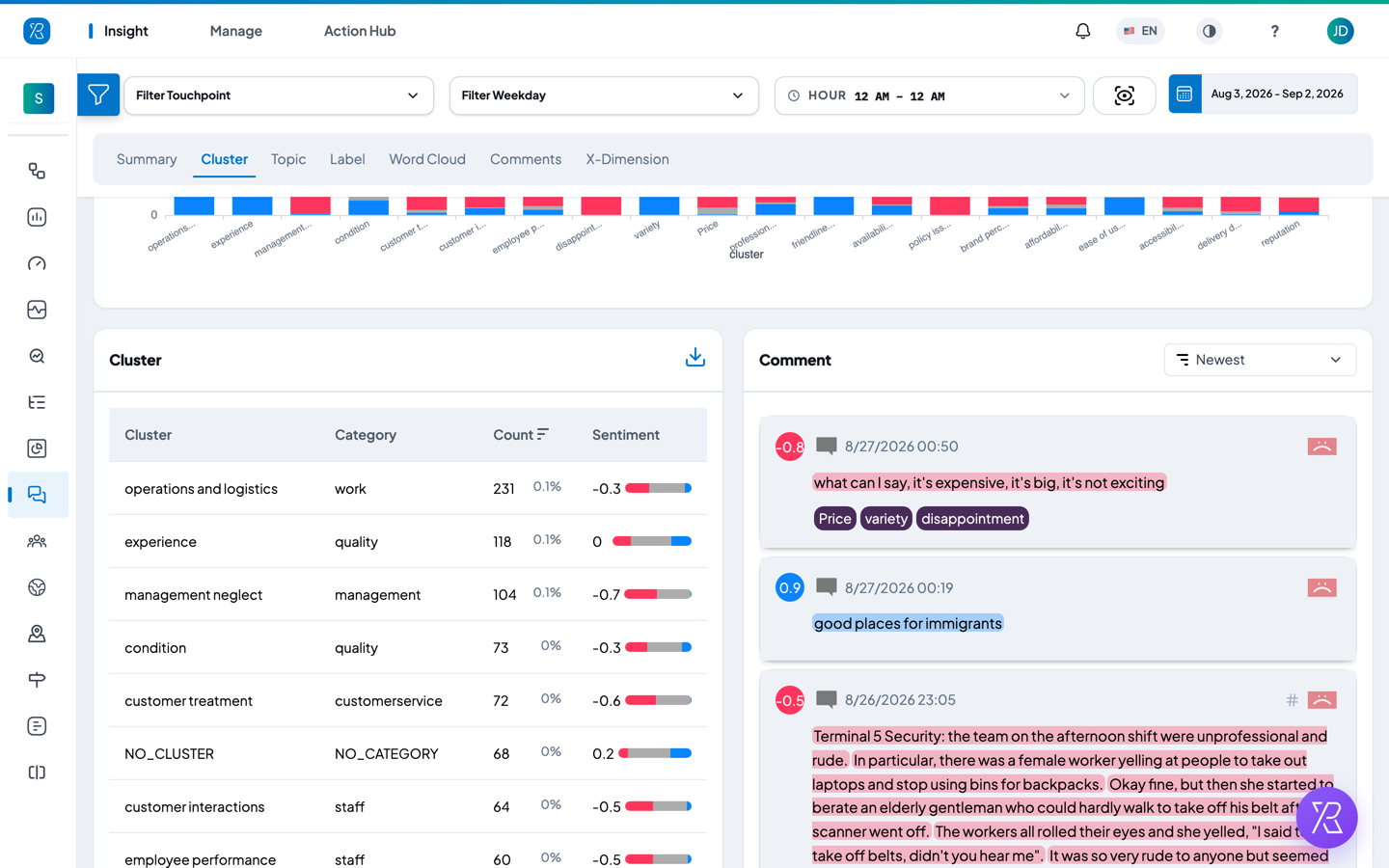
Comments with no theme detected are grouped as NO_CLUSTER.
Topic
Same layout as Cluster, but for individual keywords instead of themes. Answers "what exact words are customers using?"
The table lists each topic, its type, its count and its sentiment. The type says what kind of thing the word is — a Facility, a Location, an Organization, a Person, a DateTime and so on. Click a topic to see only the comments that contain it. Comments with no keyword picked out appear as NO_TOPIC.
Label
Same layout again, but for the labels your team applies to responses. Answers "how do the responses we tagged actually read?"
Label Trend charts each label by number of comments, coloured by sentiment. The Label table below lists each label, its count and its average sentiment. Click a label to see its comments.
Only labels your team has created show up here, so this tab is empty until you set some up — see Label Management.
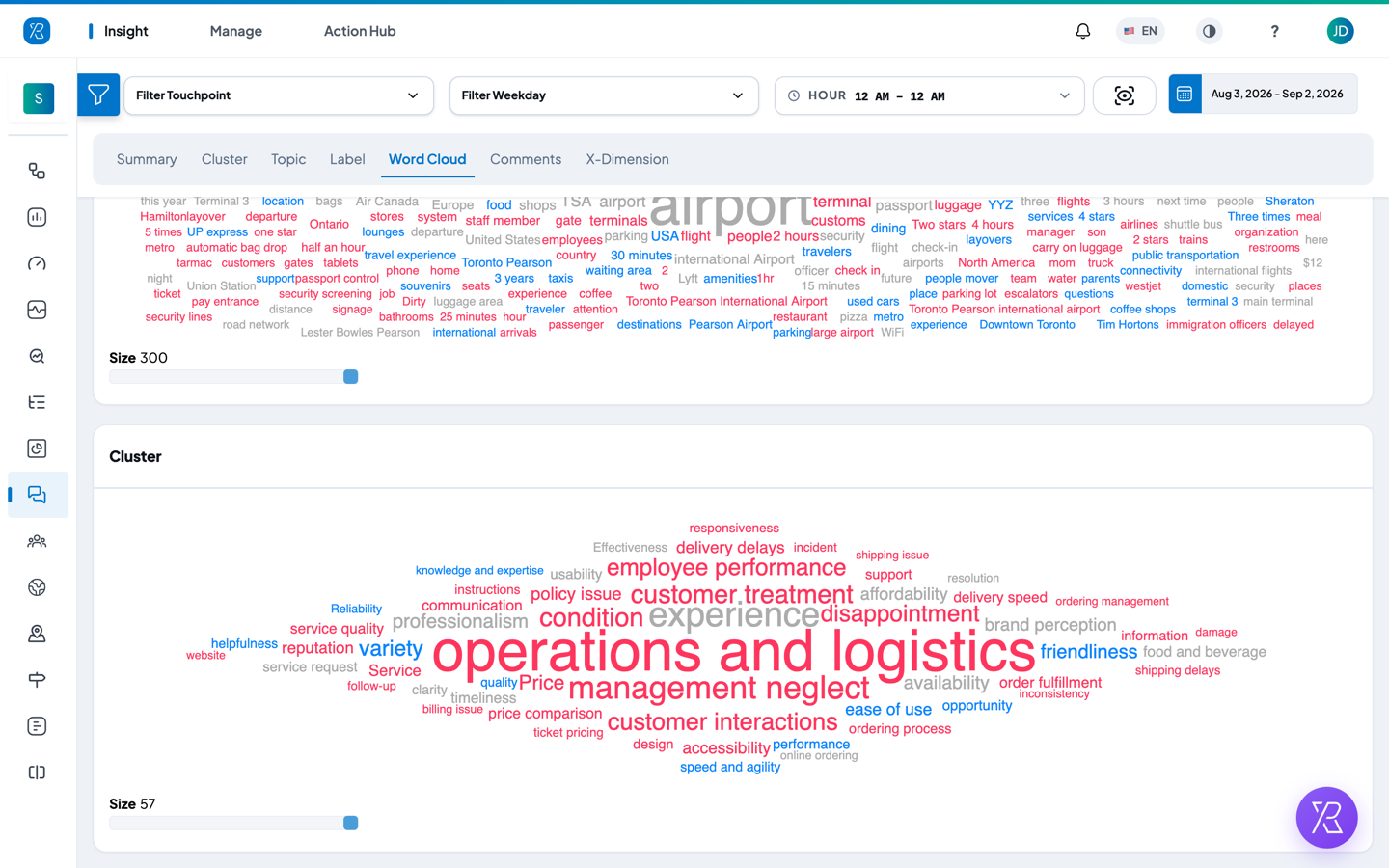
Word Cloud
A quick visual read of the same information. Answers "what stands out at a glance?"
There are two clouds, one under the other: Topics at the top for individual keywords, Cluster below it for themes. Bigger text means the word came up more often. The colour shows sentiment — blue for positive, red for negative, grey for neutral.
Drag the Size slider under each cloud to show more or fewer words.
Comments
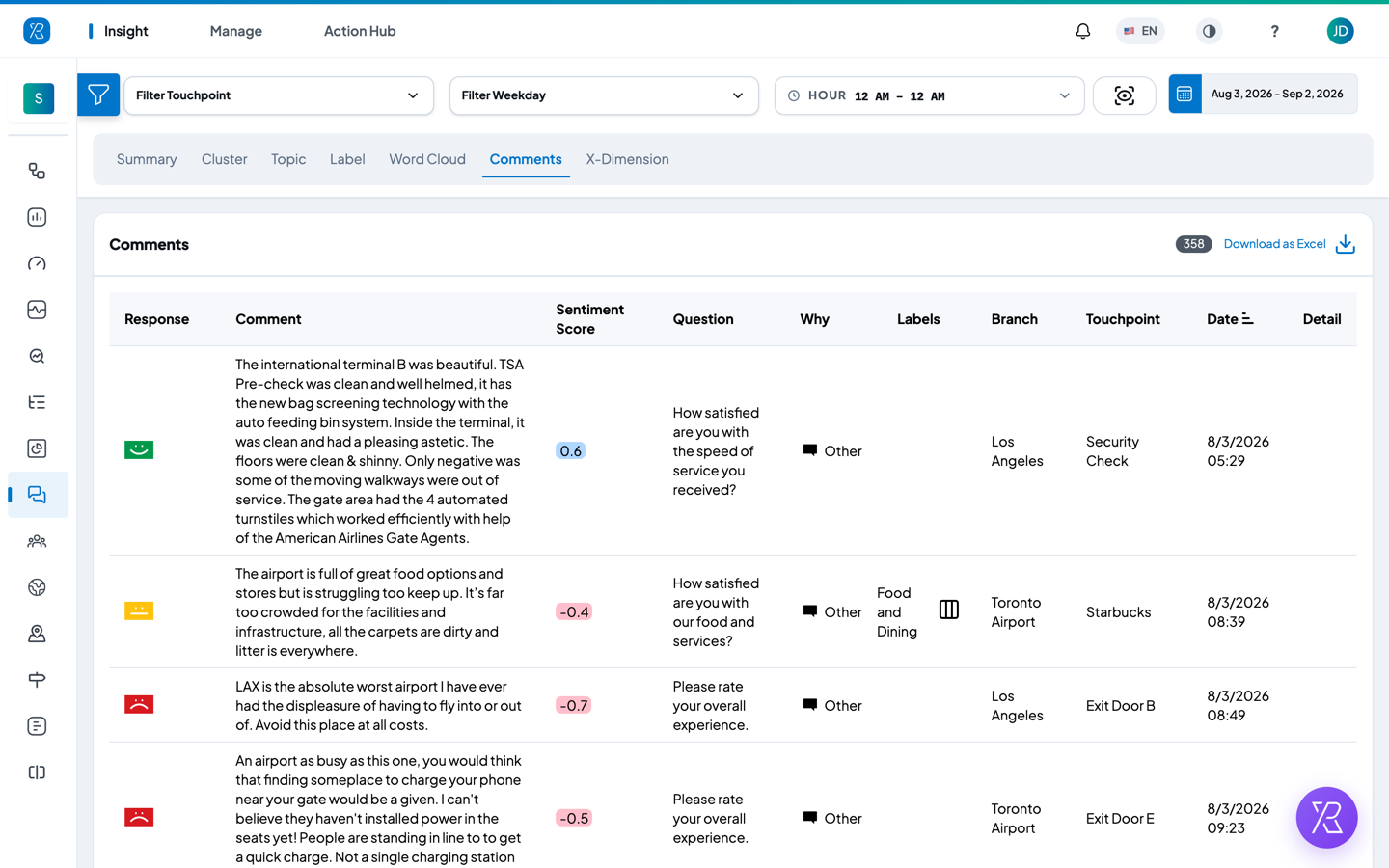
The raw list. Answers "what did people actually say?"
Each row shows the rating the customer gave, the full comment text, its sentiment score, the question they were answering, their reason, any labels on the response, and the branch, touchpoint, date and time. Click Detail at the end of a row to open the full feedback record.
Click a column heading to sort. The count next to Download as Excel tells you how many comments match your current filters, and that link exports them.
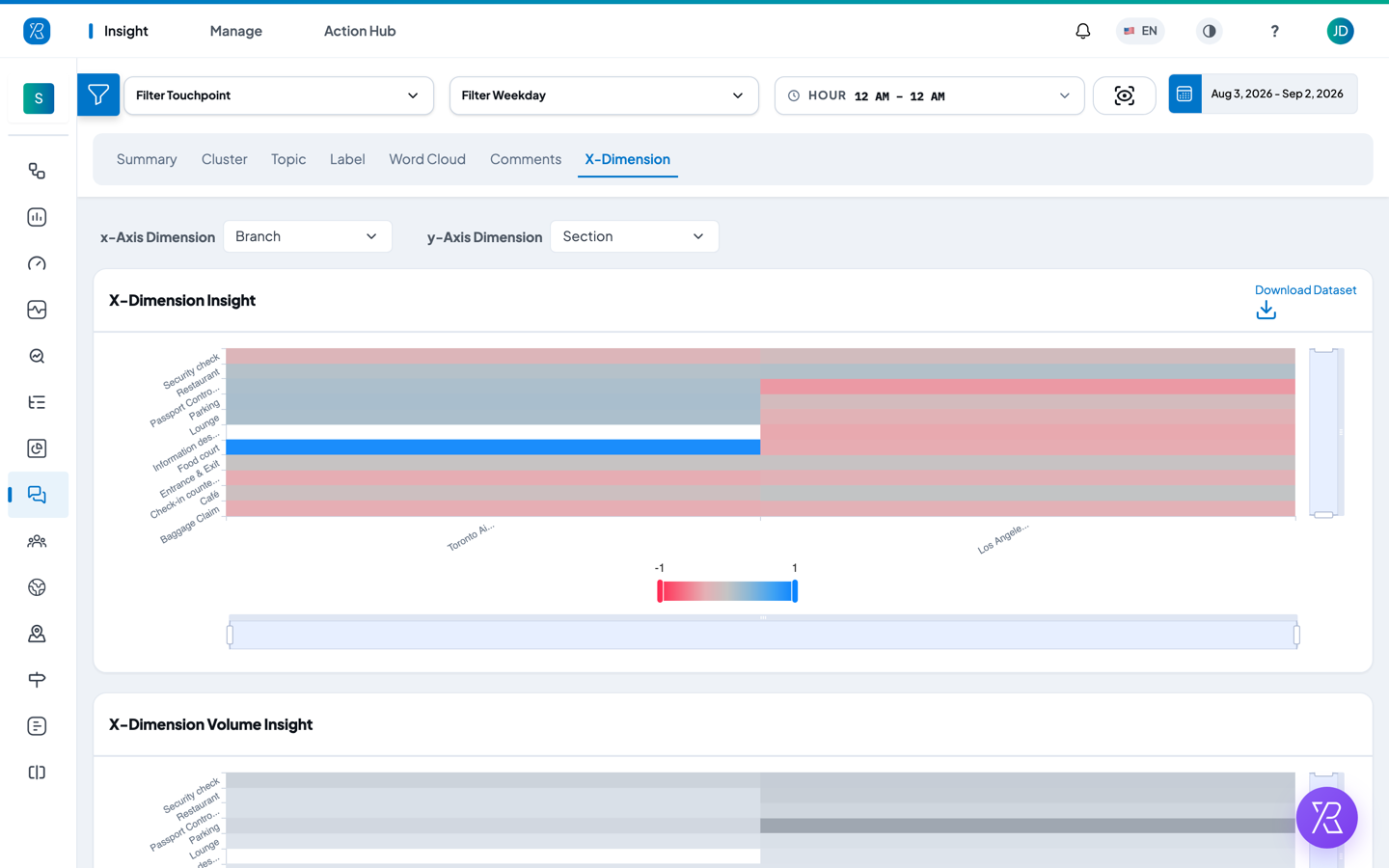
X-Dimension
Cross-tabs two things against each other. Answers "is this problem everywhere, or just at one place?"
- Pick an x-Axis Dimension — for example Branch.
- Pick a y-Axis Dimension — for example Touchpoint.
Both dropdowns offer Branch, Section, Question, Why, Agent, Label, Label Category, Collector Type, Topic, Cluster and Cluster Category.
X-Dimension Insight draws the result as a heat map coloured by sentiment. The scale under the grid runs from -1 in red to 1 in blue. X-Dimension Volume Insight below it shows the same grid coloured by how many comments sit in each cell — useful for checking a red square is not just one grumpy comment.
If you pick a dimension with a lot of values, such as Touchpoint, the grid gets tall. Use the scroll bars at the edge of the chart, or pick a smaller dimension such as Section.
Use Download Dataset to export the grid.