What is a Branch, Section & Touchpoint
Branch, Section, and Touchpoint are used to define and configure the interaction points to collect feedback. These three would build up the hierarchy of the organization for feedback collection which would give better insights when looking at the dashboard and the results.
For example, if an organization has three physical locations (at different addresses across cities or countries) define a separate branch for each of these locations. This would enable organizations to compare feedback results across different branch locations besides seeing the aggregated results at the organization level. Similarly, customers have multiple interaction points with the organization and brand (customer journey) where you want to collect feedback. At each interaction point create a touchpoint and assign a collector to gather feedback. Each interaction point (the touchpoint) will be assigned to a Section within the branch. This will provide a grouping of touchpoints which provides a different aspect in the reporting.
[Note] You need admin access to create or edit touchpoints. Reach out to your Press’nXPress admin user if needed.
What is a Branch?
An organization has one or more branches. By default, there is the main branch (e.g. headquarter) for every organization. If your organization has more than one location, for every other physical location add a new branch so that you can see the results and insights at the organization level or per each branch. Also, you would be able to compare different branches' results. Touchpoints will be added to the branches to collect feedback.
[Note] We suggest to add corporate level touchpoints e.g. website, email, IVR touchpoints to main branch unless there is a need to add them to the other branches.
What is a Touchpoint?
Touchpoints - simply a point of interaction- are all the places within your organization ranging from the website, app, call center to physical places such as entrance, information desk, etc. where customers would interact with the organization i.e. Customer Journey. Touchpoints can be physical (cashier counter) or digital interaction points (checkout page website). For every touchpoint of the customer journey, create a touchpoint and assign a feedback collector.
What is a Section?
Each touchpoint will be assigned to a Section within the branch. This will provide a grouping of touchpoints that are related to the same area/department that feedback is collected. For example, if there are multiple touchpoints in the website then all of those touchpoints will be assigned to the Website Section. In this way, besides seeing the detailed results per touchpoint you could also see the aggregated data across all website touchpoints at the section level. As another example assume there are 5 checkout counters. At each counter, you will define a touchpoint and assign a feedback terminal. All 5 touchpoints can be assigned to the Counter section so that the aggregated results can be seen for all 5 touchpoints.
Sample Touchpoint Mapping Scenarios
In the scenarios below, we illustrate potential touchpoint mapping for different organizations.
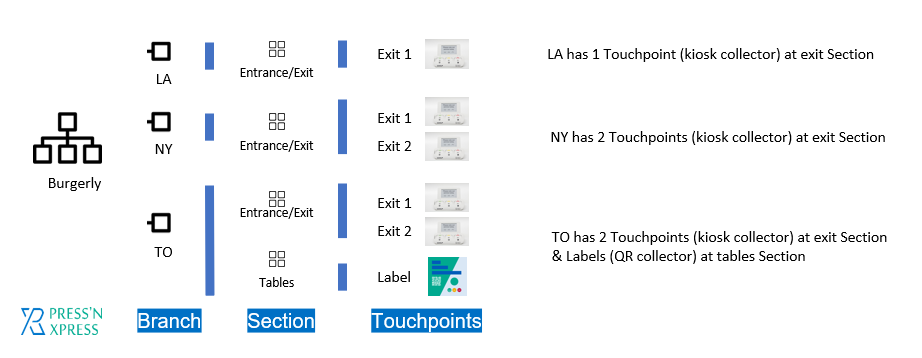
Scenario one: Burgerly
Burgerly is a franchise company that has 3 branches in LA, NY and TO.
Scenario two: Shargo
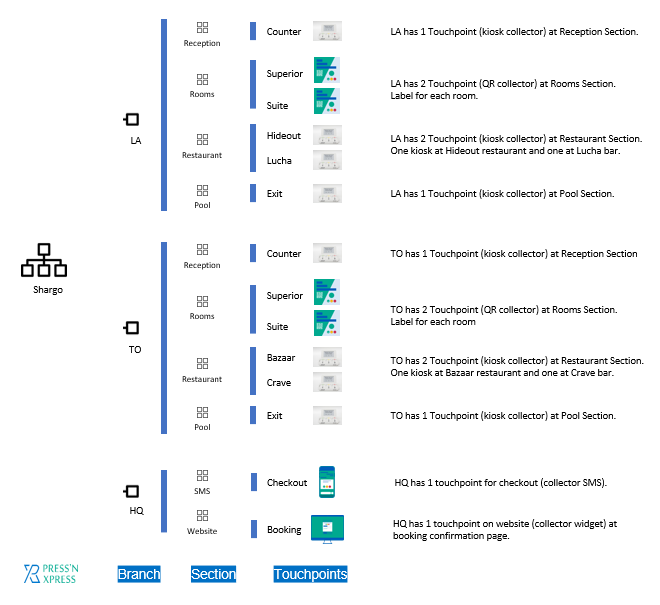
Shargo is a hotel that has 2 branches in LA and TO.
How to create a touchpoint?
To create a new touchpoint go to the touchpoint tab, add a new touchpoint, select branch, section, and feedback collector. See below guides to add or edit touchpoints:
- Smiley Feedback Terminal Touchpoint
- Website/App Feedback Collector Touchpoint
- QR/Chip Feedback Collector Touchpoint
- Email Feedback Collector Touchpoint
- Signature Feedback Collector Touchpoint
- SMS Feedback Collector Touchpoint
- IVR Feedback Collector Touchpoint
If you have any question contact support@ pxp.ai