Webhooks
A webhook tells a system you own, at an https URL you choose, when something happens in your
organization: a response arrives, or a respondent saves or submits a survey. Press'nXPress sends one
signed POST request for each event. Failed requests are retried, and every delivery is listed in the
dashboard.
Use webhooks to put feedback into your CRM, your ticketing system or your own database as it arrives, without having to ask for it.
This page has two parts:
- Set up a webhook explains the dashboard.
- For developers: receiving webhooks is what the receiving system needs: the requests we send, how to verify them, and how we behave when delivery fails.
Who can set up webhooks
Webhooks live on the Organization Settings page, in Manage > Settings > Organization. See Organization Settings.
The Webhooks card only appears if your account has the ManageWebhooks permission for this organization. If you cannot see the card, ask your Press'nXPress administrator. The people with this permission are also the ones who get an email when a webhook is suspended.
Set up a webhook
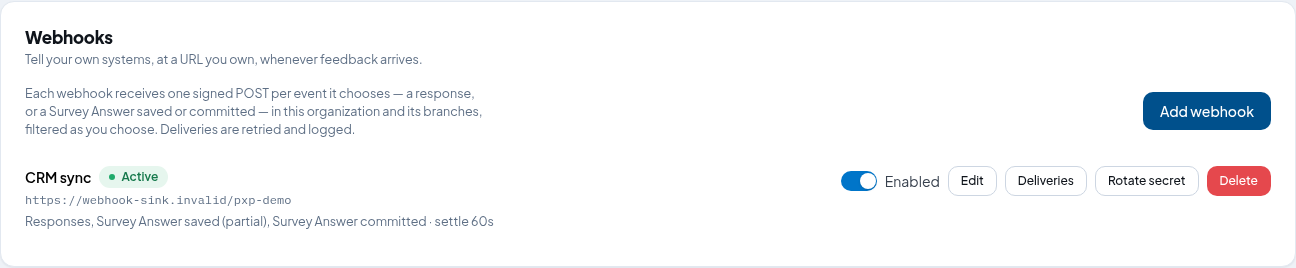
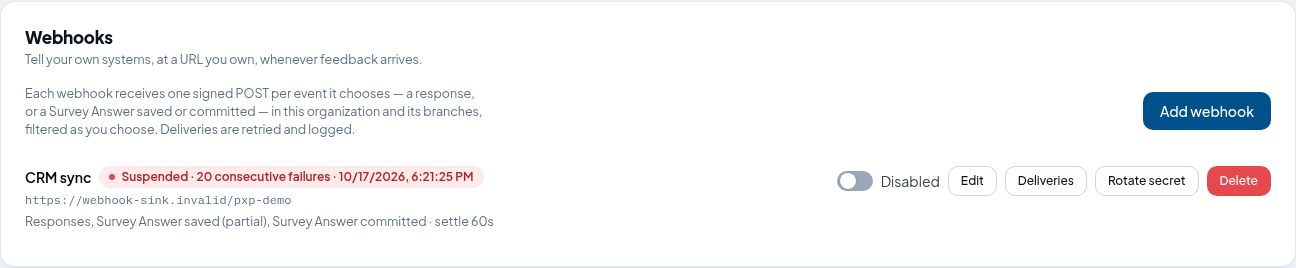
Each row on the card is one webhook. It shows the name, a status chip (Active or Suspended), the URL, and the events it receives with its settle delay. The buttons on the right:
- Enabled / Disabled: turns the webhook on or off without deleting it.
- Edit: changes everything except the secret.
- Deliveries: the log of every request sent to this webhook. See Deliveries.
- Rotate secret: replaces the signing secret. See Rotate the secret.
- Delete: removes the webhook.
Add a webhook
- Click Add webhook.
- Type a Name, such as "CRM sync". Only you see it.
- Type the URL that will receive the requests. It must start with
https://and point to a public host (see Which URLs are accepted). - Under Events, pick at least one:
- Responses: each rating or comment left on a touchpoint.
- Survey Answer saved (partial): each time a respondent's progress on a survey is saved, before they finish.
- Survey Answer committed: when a respondent finishes a survey, and again whenever a finished answer is saved.
- Optionally, add an Extra header: a name and a value sent with every request. Use it only for a receiver that cannot verify the signature, such as a tool that only checks a fixed token.
- Set the Settle delay in seconds, from 0 to 3600. We wait this long before sending, so a comment, its sentiment or a label that arrives shortly after the rating is included. See Timing and the settle delay.
- Optionally, narrow the webhook with Filters (see below).
- Click Create.
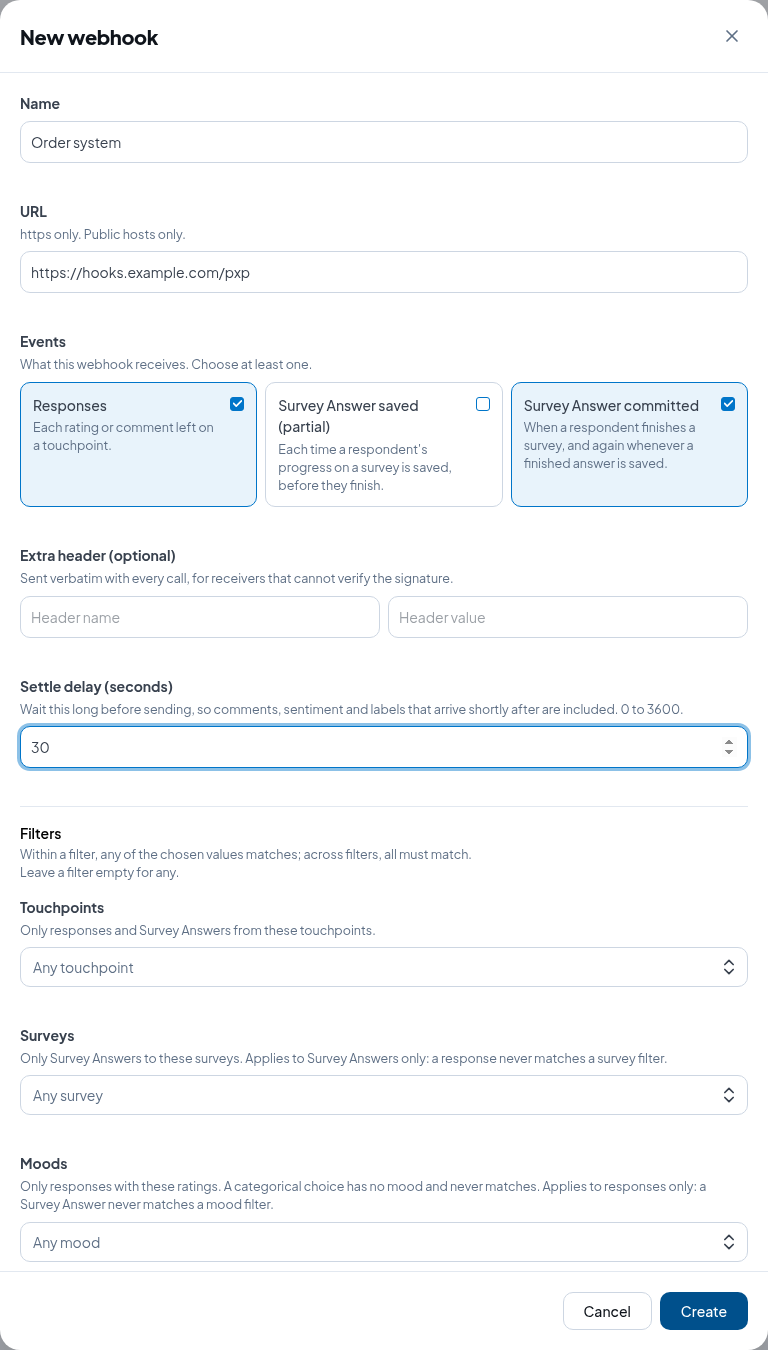
The secret appears once, straight after you create the webhook. Copy it and give it to whoever runs the receiving system. It is never shown again; if you lose it, rotate it to get a new one.
Filters
A webhook covers your organization and all its branches. Filters narrow it. Leave a filter empty to accept everything.
- Touchpoints: only responses and Survey Answers from these touchpoints.
- Surveys: only Survey Answers to these surveys. A response never matches a survey filter.
- Moods: only responses with these ratings (happy, meh, sad). A categorical response has no mood and never matches. A Survey Answer never matches a mood filter.
- Agents: only responses attributed to these agents. A terminal press has no agent and never matches. A Survey Answer never matches an agent filter.
Within one filter, any of the chosen values matches. Across filters, all of them must match. So a webhook with a Moods filter of sad and an Agents filter of Dana only receives sad responses attributed to Dana.
Because a Survey Answer never matches a mood or agent filter, a webhook that has either of these filters receives no Survey Answer events at all.
Send a test
Open Deliveries and click Send test. We send a ping event to the URL so you can check that
the receiver is reachable and that it verifies the signature. A test is listed in the deliveries like
any other request.
Rotate the secret
Click Rotate secret, then confirm. The new secret is shown once, in the same way as after you create a webhook.
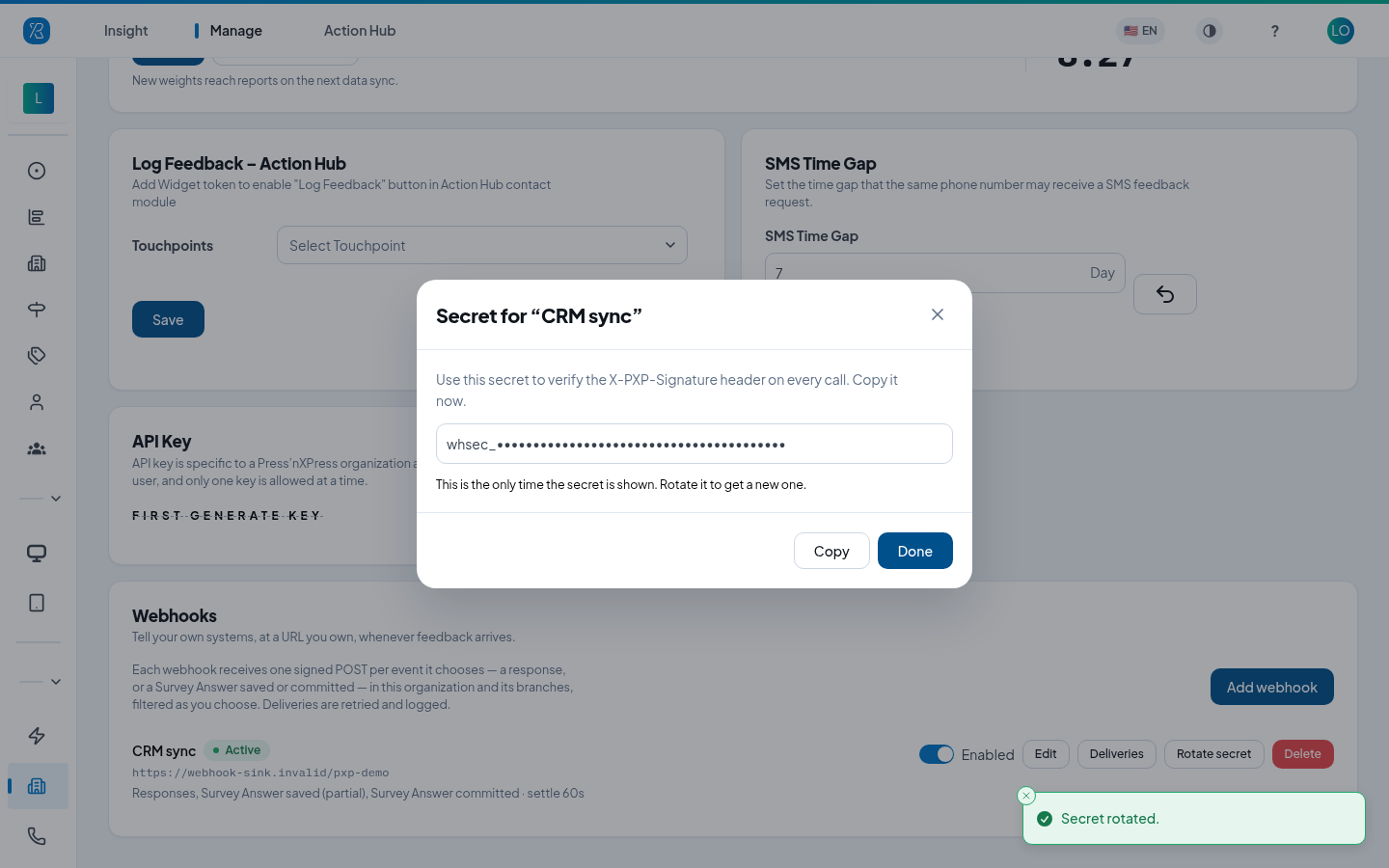
The old secret stops verifying at once, so update the receiving system straight away. Rotate the secret whenever you think it may have leaked.
Deliveries
Click Deliveries on a webhook to see every request we made to it in the last 30 days, newest first.
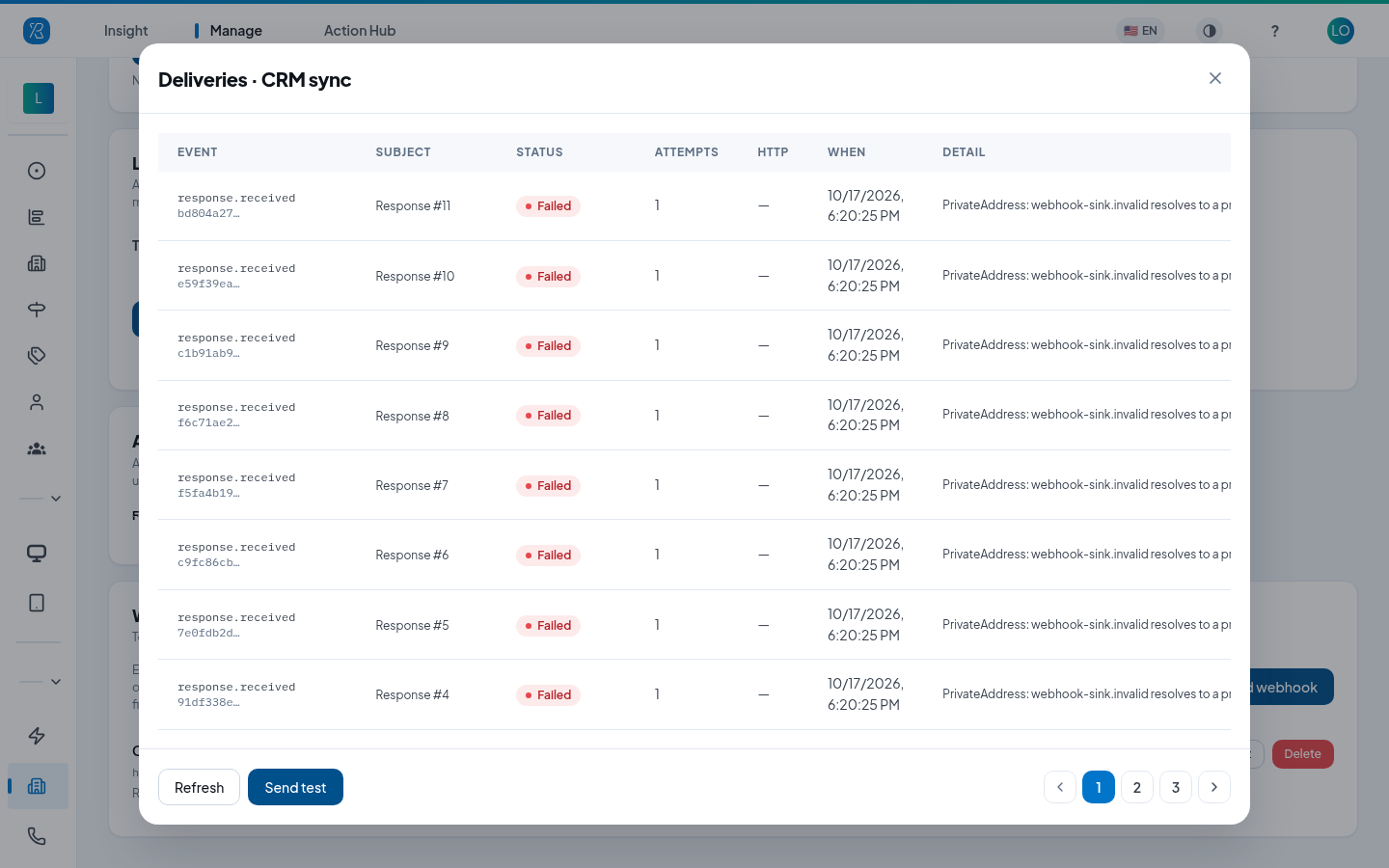
| Column | What it shows |
|---|---|
| Event | The event type, such as response.received, and the start of the event id. |
| Subject | What the event is about, such as Response #11 or Survey Answer #19. |
| Status | Pending (waiting or retrying), Succeeded, Failed (gave up), or Superseded (a newer state of the same Survey Answer replaced it, so it was never sent). |
| Attempts | How many times we tried. |
| HTTP | The status code your server last answered with. A dash means there was no answer, for example a timeout. |
| When | When the delivery was made. |
| Detail | Why the delivery failed, if it did. |
Redeliver on a row sends the same event again, with the same event id. Use it after you fix a problem on the receiving side. A superseded delivery cannot be redelivered.
Refresh reloads the list; Send test sends a ping. Deliveries are kept for 30 days, together
with the first kilobyte of your server's answer to each attempt.
When a webhook is suspended
If 20 events in a row use up all their attempts, we stop sending to the webhook and mark it Suspended. A webhook is also suspended at once if your server answers 410 Gone.
Everyone in the organization who can manage webhooks receives an email, titled Webhook "CRM sync" has been suspended:
Your webhook CRM sync (https://…) has been suspended because 20 consecutive events could not be delivered after all retries.
No further events will be sent to it until you re-enable it under Organization Settings → Webhooks. Re-enabling clears the failure count.
To start it again, fix the receiving system, then switch the webhook back to Enabled. Re-enabling clears the failure count. Only an enabled, active webhook receives events, so nothing is queued for it while it is suspended or disabled. Use Redeliver in Deliveries for any failed events you still need.
Which URLs are accepted
- The URL must use https.
- It must point to a public host. Private and local addresses are refused:
localhost, names ending in.localor.internal, and private IPv4 or IPv6 addresses. - A host whose name resolves to a private address is refused when we send, and the delivery fails with a PrivateAddress detail.
- We never follow redirects. Give the final URL.
For developers: receiving webhooks
The request
One POST per event, Content-Type: application/json, with these headers:
| Header | Meaning |
|---|---|
X-PXP-Event-Id | Id of the event. Deduplicate on it: you may receive the same event twice. |
X-PXP-Event-Type | response.received, survey.answer.saved, survey.answer.committed, or ping. Same as type in the body. |
X-PXP-Webhook-Id | The webhook this was sent to. |
X-PXP-Timestamp | Unix seconds when the request was signed. |
X-PXP-Signature | v1=<hex>. See Verify the signature. |
User-Agent | PressnXPress-Webhooks/1. |
If you set an Extra header on the webhook, it is sent as well, exactly as you typed it.
Answer within 10 seconds. We do not follow redirects.
Verify the signature
Every webhook has a secret that starts with whsec_. To verify a request:
- Take the raw request body exactly as received, before parsing it.
- Build the string
<X-PXP-Timestamp>.<raw body>: the timestamp, a dot, then the body. - Compute the HMAC-SHA256 of that string, using the whole secret (including
whsec_) as the key. Hex-encode it. - Compare it, in constant time, with the value after
v1=inX-PXP-Signature. - Reject requests whose timestamp is more than five minutes away from your clock. This stops a captured request from being replayed.
import { createHmac, timingSafeEqual } from "node:crypto";

export function verify(rawBody, headers, secret) {
  const timestamp = headers["x-pxp-timestamp"];
  const expected = createHmac("sha256", secret).update(`${timestamp}.${rawBody}`).digest("hex");
  const received = String(headers["x-pxp-signature"]).replace(/^v1=/, "");
  const fresh = Math.abs(Date.now() / 1000 - Number(timestamp)) < 300;
  return fresh && received.length === expected.length && timingSafeEqual(Buffer.from(received), Buffer.from(expected));
}
After you rotate the secret, the old one stops verifying at once.
Answering, retries and suspension
| Your answer | What we do |
|---|---|
Any 2xx | Delivered. The body is ignored; we keep its first kilobyte for your debugging. |
5xx, 408, 429, a timeout or a connection error | Retry with exponential backoff, starting after a minute: 6 attempts over about an hour. |
Any other 4xx | Not retried, because the same request would get the same answer. |
410 Gone | The webhook is suspended immediately. |
When 20 events in a row use up their attempts, the webhook is suspended and the people who can manage webhooks are emailed (see When a webhook is suspended). Response and Survey Answer events count towards the same 20.
Event ids and deduplication
Delivery is at least once. A retry, a Redeliver from the dashboard, or a re-run on our side
sends the same X-PXP-Event-Id (the body's id). Make your handler idempotent on it: if you have
already processed an id, answer 2xx and do nothing.
An event id belongs to one revision of what it describes, not to the response or survey answer as a whole:
- Responses. A response can change after its first event was sent. Most often the customer types
their comment a minute or two after tapping the smiley, but a why, an agent or a corrected mood can
also arrive later. When that happens we send another
response.receivedevent, with a new id and a laterdata.response.updatedAt. Deduplicating on the event id keeps both events, which is what you want: the second one is an update, not a duplicate. - Survey Answers. Each saved state of an answer has its own id, fixed by
data.surveyAnswer.revisionand the event type.
data.response.iddata.response.id is the response's own id and is the same in every event about that response. If
you drop events whose data.response.id you have already seen, you throw away exactly the updates
described above.
Labels do not send a new event. Labels are stored apart from the response, so a label added
after the first event does not produce another event. A label that is already on the response
when the event is sent is included in labels. A longer settle delay gives labels more time to
arrive.
Events have no ordering guarantee. To keep the latest state:
- of a response, compare
data.response.updatedAt. Do not useoccurredAt: it is when the feedback happened, so it is the same in every event about that response. - of a survey answer, compare
data.surveyAnswer.revision. When two events have the same revision,committedis later thansaved.
An event older than one you already hold is never news; ignore it.
Timing and the settle delay
Response events are sent once our analytics pipeline has recorded the response, then after the webhook's settle delay. A comment, its sentiment and labels can arrive a little after the rating; the settle delay holds the event so they are included in the first event. If something other than a label arrives later, you get a second event (see above).
A Survey Answer event is sent once its settle delay has passed, counted from when we received the save. If the same survey answer is saved again during that time, only the latest state is sent. A settle delay of a minute therefore turns a respondent's burst of saves into one request.
The body
Every event shares one envelope and adds a data object that depends on type. apiVersion names
the schema of data. It is "2" for every event type today, and it changes only when a receiver
could notice. New fields can be added without a version change, so ignore fields you do not know.
{
  "id": "5b3f4e0a-2c6e-5d1a-9f0b-8c7d6e5f4a3b",
  "type": "response.received",
  "apiVersion": "2",
  "occurredAt": "2026-09-10T10:20:00.000Z",
  "webhookId": 7,
  "organizationId": 1,
  "data": { "...": "see below" }
}
ping
Sent when you click Send test. data is { "message": "Test event from Press'nXPress" }.
response.received
Everything we know about one response at the moment the event is sent. Fields that a response from
some collector never has are null, not missing.
{
  "id": "5b3f4e0a-2c6e-5d1a-9f0b-8c7d6e5f4a3b",
  "type": "response.received",
  "apiVersion": "2",
  "occurredAt": "2026-09-10T10:20:00.000Z",
  "webhookId": 7,
  "organizationId": 1,
  "data": {
    "response": {
      "id": 501,
      "collector": "Terminal",
      "receivedAt": "2026-09-10T10:20:00.000Z",
      "updatedAt": "2026-09-10T10:22:05.000Z",
      "localTime": "2026-09-10T13:20:00",
      "timezone": "Asia/Amman",
      "mood": -1,
      "terminalId": 42,
      "context": { "table": 4 }
    },
    "touchpoint": {
      "id": 1,
      "name": "Front desk",
      "language": "en",
      "timezone": "Asia/Amman",
      "collector": "Terminal"
    },
    "organization": { "id": 1, "name": "Prince Hamza Hospital" },
    "branch": { "id": 10, "name": "Emergency" },
    "question": { "id": 3, "title": "How was your visit?" },
    "why": { "id": 12, "name": "Wait time" },
    "comment": {
      "id": 9,
      "text": "Waited forty minutes",
      "kind": "comment",
      "sentiment": { "score": -0.6, "magnitude": 0.9 },
      "voiceUrl": null,
      "receivedAt": "2026-09-10T10:22:00.000Z"
    },
    "choices": [],
    "labels": [{ "id": 5, "name": "Long wait", "category": "Operations" }],
    "agent": { "id": 4, "firstName": "Dana", "lastName": "Haddad", "email": "dana@example.com" },
    "respondent": {
      "id": 7,
      "identifier": "+962790000000",
      "firstName": null,
      "lastName": null,
      "email": "r@example.com",
      "phone": "+962790000000",
      "company": null,
      "extra": null
    }
  }
}
Field notes:
response.moodis1happy,0meh,-1sad, ornullfor a categorical response.response.updatedAtis when the response last changed. Use it to order two events about the same response.response.collectorandtouchpoint.collectorname the channel:Terminal,Website(the QR collector),Widget,Email,SMS,IVR,Tablet,Signature.response.localTimeis the wall-clock time at the touchpoint, with no offset;response.timezonesays where.receivedAtandoccurredAtare the same moment in UTC.question.titleandwhy.nameare plain text in the touchpoint's language (touchpoint.language), falling back to English.comment.kindiscomment(free text),why(a chosen why), orabc(a terminal ABC press).choicesis filled for categorical responses.labelsholds every label on the response or its comment when the event is sent.
survey.answer.saved and survey.answer.committed
A Survey Answer is one respondent's answers to a multi-question survey. We send it:
- as
survey.answer.savedeach time the respondent's progress is saved partway through, withdata.surveyAnswer.statusset to"partial"; - as
survey.answer.committedwhen they submit it, withstatusset to"committed".
Each event type is chosen on the webhook separately. A webhook that only wants finished surveys picks
Survey Answer committed alone. These events are signed, retried and suspended in the same way as
response.received, with the same secret.
Every event is the whole answer, not a change. answers holds everything answered so far. A later
event about the same surveyAnswer.id replaces an earlier one; it does not add to it.
Superseded saves. We never send a state of an answer that is older than one we already hold for
your webhook. If a newer save arrives while an earlier one is still waiting out the settle delay, the
earlier one is superseded: it is never sent, and Deliveries lists it as Superseded. So you
can receive a committed event with no saved event before it. That is normal.
Redelivering a Survey Answer sends the same bytes as the original request: the body is frozen
when the event is recorded, so the signature verifies over the same string. Only X-PXP-Timestamp
and X-PXP-Signature are new.
What is in data:
surveyAnswer:id,status("partial"or"committed"),revisionandlanguage. The language is the one the respondent answered in; question text, choice text and why names are in that language, falling back to English.survey:id, andversion, the version of the survey the respondent was shown.touchpoint:id,tokenandname.organizationandbranch:idandname. These are read when we process the event, so a touchpoint moved to another branch reports its new branch.respondent:id:nullfor an anonymous respondent.info: the answers to respondent information fields (name, email and so on), each as{ fieldId, question, value }.context: what the collecting channel attached, ornull. Only an IVR call attaches anything today:{ "_tag": "IVR", "to", "from", "contact", "agent" }(contactcan benull). Ignore a_tagyou do not know; new channels may be added.
answers: one entry per answered question, in survey order, told apart bytype.fieldIdidentifies the question within the survey version, andquestionis its text as the respondent saw it.questionIdis the question's id in the question bank (an open comment's id foropenCommentandvoiceText); awhyanswer only has one inside anIndependentsource. Amoodis-1sad,0meh,1happy.-
scale:scale(the number of points:ThreePoints,FivePoints,SevenPoints,TenPointsorElevenPoints),value(the point chosen),label(that point's text, ornullif the point is no longer on this version's scale) andmood. It carries no why or comment; those are answers of their own. -
why:whys([{ id, name }], the first is the main one),mood, andsource, which is one of:{ "_tag": "FollowUp", "followUpOf": <fieldId> }: a follow-up Why question about the scale whosefieldIdisfollowUpOf. Itsmoodis the mood of the point chosen on that scale.{ "_tag": "Independent", "questionId": <number> }: a Why question of its own, backed by the bank questionquestionId. Itsmoodcomes from that question.
moodisnullwhen there is none to give, for example a follow-up whose scale was not answered. -
multipleChoice:choices([{ id, text }]). This is a Categorical question. -
openComment:text, andsource, which is one of:{ "_tag": "FollowUp", "followUpOf": <fieldId> }: a follow-up comment about that scale. It has no mood of its own; use the mood of thescaleanswer it follows.{ "_tag": "Standalone" }: a comment question of its own.
-
voiceText:text(typed) andtranscript(spoken). Either can benull. No audio URL is sent.
-
A follow-up is only asked when its Show when rule matches, so it is missing from answers when
the respondent was not shown it. A why that has been deleted keeps its id with an empty name, and
a choice that is no longer offered keeps its id with empty text. No IP address or user agent is
sent.
{
  "id": "0d6a1f7e-3b2c-5e4d-8a9b-1c2d3e4f5a6b",
  "type": "survey.answer.committed",
  "apiVersion": "2",
  "occurredAt": "2026-09-23T09:15:30.000Z",
  "webhookId": 7,
  "organizationId": 1,
  "data": {
    "surveyAnswer": {
      "id": 8812,
      "status": "committed",
      "revision": "2026-09-23T09:15:30.000Z",
      "language": "en"
    },
    "survey": {
      "id": "3f8e2d1c-4b5a-4968-8776-5a4b3c2d1e0f",
      "version": "9a8b7c6d-5e4f-4a3b-8c2d-1e0f9a8b7c6d"
    },
    "touchpoint": {
      "id": 12,
      "token": "c4b3a291-8f7e-4d6c-9b5a-4e3d2c1b0a9f",
      "name": "Discharge survey"
    },
    "organization": { "id": 1, "name": "Prince Hamza Hospital" },
    "branch": { "id": 10, "name": "Emergency" },
    "respondent": {
      "id": 305,
      "info": [
        { "fieldId": "6f1c2a4e-0b7d-4c3e-9a5f-000000000001", "question": "Your email", "value": "r@example.com" }
      ],
      "context": {
        "_tag": "IVR",
        "to": "+15550100",
        "from": "+15550123",
        "contact": "Ada Lovelace",
        "agent": "Nurse Station 2"
      }
    },
    "answers": [
      {
        "type": "scale",
        "fieldId": "6f1c2a4e-0b7d-4c3e-9a5f-000000000002",
        "question": "How likely are you to recommend us?",
        "questionId": 41,
        "scale": "FivePoints",
        "value": 3,
        "label": "Not sure",
        "mood": -1
      },
      {
        "type": "why",
        "fieldId": "6f1c2a4e-0b7d-4c3e-9a5f-000000000003",
        "question": "What should we improve?",
        "whys": [
          { "id": 12, "name": "Wait time" },
          { "id": 15, "name": "Staff attitude" }
        ],
        "mood": -1,
        "source": { "_tag": "FollowUp", "followUpOf": "6f1c2a4e-0b7d-4c3e-9a5f-000000000002" }
      },
      {
        "type": "openComment",
        "fieldId": "6f1c2a4e-0b7d-4c3e-9a5f-000000000004",
        "question": "Tell us more",
        "questionId": 16,
        "text": "Nobody explained the medication",
        "source": { "_tag": "FollowUp", "followUpOf": "6f1c2a4e-0b7d-4c3e-9a5f-000000000002" }
      },
      {
        "type": "multipleChoice",
        "fieldId": "6f1c2a4e-0b7d-4c3e-9a5f-000000000005",
        "question": "Which services did you use?",
        "questionId": 43,
        "choices": [{ "id": 3, "text": "Pharmacy" }]
      },
      {
        "type": "openComment",
        "fieldId": "6f1c2a4e-0b7d-4c3e-9a5f-000000000006",
        "question": "Anything else?",
        "questionId": 17,
        "text": "The night nurse was kind",
        "source": { "_tag": "Standalone" }
      },
      {
        "type": "voiceText",
        "fieldId": "6f1c2a4e-0b7d-4c3e-9a5f-000000000007",
        "question": "Tell us in your own words",
        "questionId": 18,
        "text": null,
        "transcript": "The waiting room was cold"
      },
      {
        "type": "why",
        "fieldId": "6f1c2a4e-0b7d-4c3e-9a5f-000000000008",
        "question": "What did you like?",
        "whys": [{ "id": 20, "name": "Cleanliness" }],
        "mood": 1,
        "source": { "_tag": "Independent", "questionId": 44 }
      }
    ]
  }
}
A partial save looks the same, with "type": "survey.answer.saved" and "status": "partial";
answers then holds only the questions answered so far.
A save can clear an answer. If a respondent's change leaves nothing answered (for example, they
unselect the choice that showed the only question they had answered), we send a
survey.answer.saved event with an empty answers list and an empty respondent.info. Because every
event is the whole answer, it replaces what you hold. A later save or commit of the same
surveyAnswer.id can follow.
A voice answer is transcribed after the respondent saves it, and the transcript arriving later does
not send a new Survey Answer event. So transcript is usually null, unless the respondent saved
again after the transcript was ready.