REST API for Email Touchpoint
[Note] Check Integration API Overview to get the API token. [Note] Keep the API tokens safe. If any of your tokens are compromised, contact support@ pxp.ai immediately to enable regeneration of the token for your integrations.
Touchpoint Token
Touchpoint token is required for email integration which will allow submitting requests using API on a specific touchpoint. You are required to supply the API token and Touchpoint token with every request, otherwise, the call will fail and an appropriate error message will be shown.
Keep the Touchpoint token safe
If any token is compromised, contact support@ pxp.ai immediately to enable regeneration of the token.
Access Touchpoint Token
You need admin access.
- Go to Manage and select Touchpoint from the menu.
- Click the Email touchpoint you want.
- Open the API tab.
The tab shows the touchpoint token, the address to post to, the fields you can send in the body, and ready-made code samples you can copy.
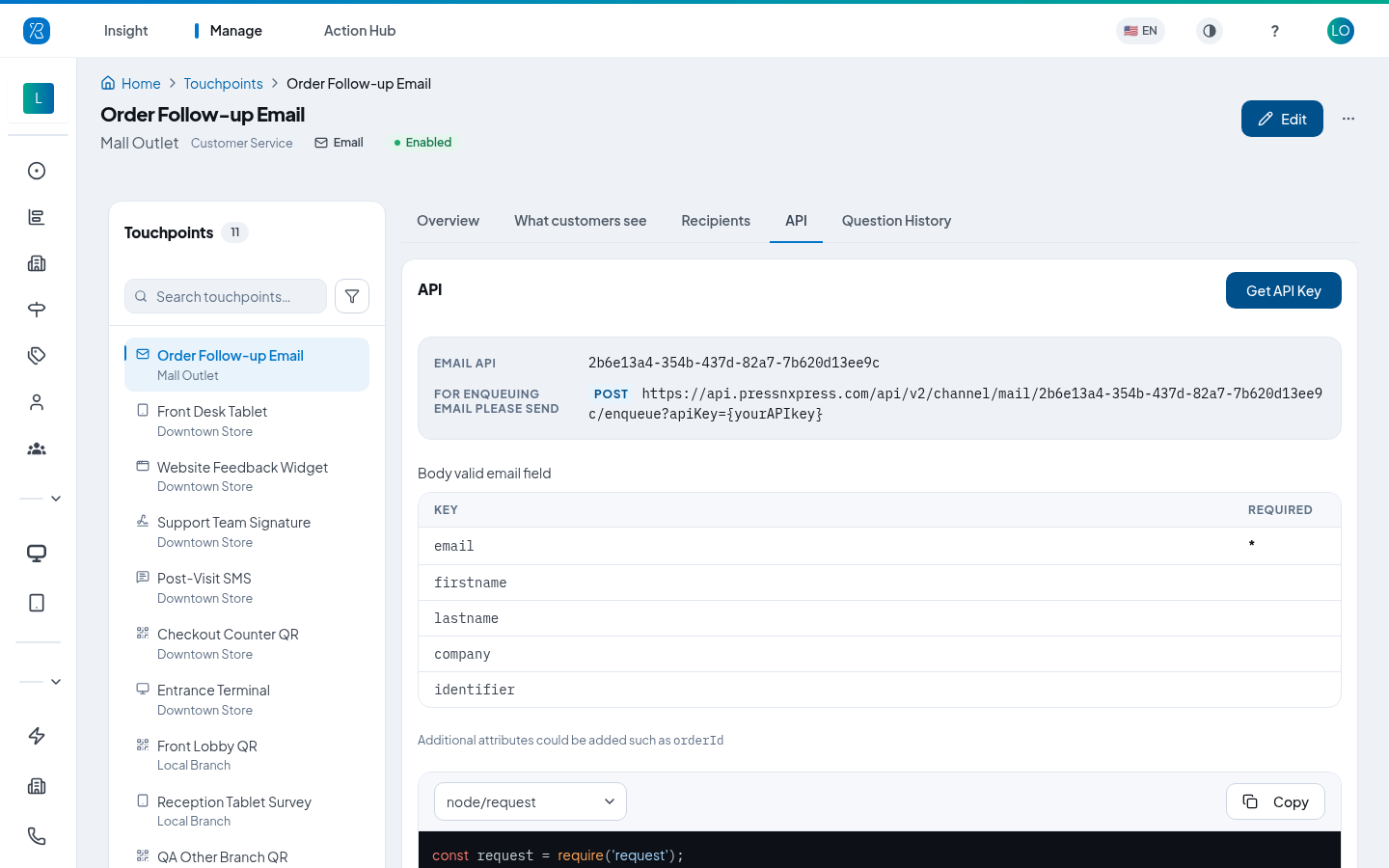
Note the API key still has to be added to that address before it will work. Click Get API Key to get it. The key belongs to the whole organization, not to one touchpoint — see Organization Settings.
Requests
All request to Press’nXPress API must be made using secure HTTPS not HTTP.
Enqueue Email
URL
https://pressnxpress.com/api/v2/channel/mail/{touchpoint token}/enqueue?apiKey={your api key}
Body
Following attributes are expected attributes with the request. These attributes will provide information and context about the contact and feedback requested. Note: the key names are case sensitive.
| Key | Required |
|---|---|
| * | |
| firstname | |
| lastname | |
| company | |
| identifier |
Additional Context
In addition to default attribute keys to identify the respondent, other elements can be passed on as part of feedback response to capture extra context related to feedback e.g. purchase amount, orderId, product SKU, etc. These additional elements should be included as pair of key and value in the body.
[Note] Additional attributes keys are case sensitive. Ensure the same format is used in all the requests. Otherwise the data will be stored and reported as a new attribute.
| Key | Required |
|---|---|
| amount | |
| SKU |
content-type
The content-type can be json or urlencoded.
CURL
curl -X POST \
  'https://pressnxpress.com/api/v2/channel/mail/{touchpoint token}/enqueue?apiKey={your api key}' \
  -H 'Content-Type: application/x-www-form-urlencoded' \
  -d 'email={targetEmail}' <b>curl</b>.
Responses
The response data is always returned as JSON.
Success Response
All success response follows the same schema.
{
  "message":"string"
}
Error Response
All error response follows the same schema.
{
  "message":"string"
}
If you have any question contact support@ pxp.ai